

MeshCore vs Meshtastic: Why Hams Are Switching, and What You Give Up
Two off-grid text networks, one real difference under the hood, and a licensing question that only matters if you hold a callsign.
If you have been anywhere near a ham forum this year, you have watched the same conversation play out. Someone posts about their Meshtastic node, someone else replies that they moved to MeshCore and will not be going back, and forty comments later nobody has explained what actually changed.
Here is the version with the marketing stripped out.
Both projects do the same basic thing. You buy a small, inexpensive radio, usually something between the size of a key fob and a deck of cards, and pair it to your phone over Bluetooth. It sends short text messages using LoRa, a low-power radio mode built to push tiny amounts of data a long way on very little battery. On its own, one of these radios might reach a mile or two. The point of a mesh is that other people’s radios pass your message along, so the network reaches considerably further than any single node could.
Worth saying up front, because it catches people out: neither of these is amateur radio out of the box. In the United States both run in the 902 to 928 MHz band as unlicensed Part 15 devices. Your neighbor who has never taken a test can buy one and use it legally. Your license does change what you are permitted to do with one, and that deserves a section of its own further down.
So if the license is not the difference, what is?
What the Two Projects Actually Are
Before the argument, the facts. Everything in this table comes from the two projects’ own documentation, release pages and source code, checked in September 2026.
| Meshtastic | MeshCore | |
|---|---|---|
| Firmware license | GPL-3.0 | MIT |
| Who runs it | Meshtastic LLC holds the trademark; a separate company, Meshtastic Solutions, handles commercial work | Created by Scott Powell of Ripple Radios; first public commit January 13, 2025 |
| How a message travels | Managed flooding. Every node rebroadcasts, after listening briefly to see whether someone else already did | Floods once to discover a route, then sends down that specific learned path |
| Maximum hops | 7, because the counter is three bits in the packet header. The docs recommend 3 | 64 internally |
| Does a handheld relay traffic? | Yes, by default | No. Only repeaters and room servers relay |
| Messages held for offline users | Not a standard role | Room servers hold recent posts, BBS style |
| Phone apps | Android and Apple clients are GPL-3.0 | The official mobile apps are closed source. The web client and JavaScript library are MIT |
| Built-in amateur radio mode | Yes. A licensed-operator setting that swaps your name for your callsign and turns encryption off | None |
| Current firmware | 2.7.26 | 1.17.1, released August 14, 2026 |
| Cost to run | Free | Free. An optional $10 unlock adds map zoom and remote administration on T-Deck hardware |
One row in that table does most of the arguing, so it is worth understanding what it actually means.
Shouting Versus Asking for Directions
Picture a crowded room. You want to get a message to someone on the far side of it.
Meshtastic’s approach is to say it out loud and let everyone who hears it repeat it. That sounds like chaos, and it would be, so the project manages it. Before a node repeats anything it listens for a moment to see whether someone else has already done the job. The node that heard your signal weakest gets to speak first, on the reasoning that a faint signal probably means distance, and repeating from out there covers more new ground. Nodes closer in hear that relay and stay quiet. It is flooding with manners.
MeshCore asks for directions first. Your first message to a new contact does flood, the same way. But when it arrives, the receiving node sends back a delivery report listing every repeater the message passed through. Your radio keeps that list. From then on it stamps the route onto the message itself, and a repeater relays it only if the next name on the list is its own. Every other repeater hears the message and ignores it.
The difference shows up when a network gets busy. Flooding means traffic grows with the number of nodes, whether or not those nodes have anything to do with your conversation.
That is not a criticism invented by MeshCore fans. It is documented by Meshtastic’s own team. In an April 2025 post the project told users to move off the default LongFast setting once a mesh passes roughly sixty nodes in close proximity, and cited a regional network in New Zealand where channel utilization at the busiest sites was peaking above 65 percent. When two-thirds of the available airtime is already occupied, messages start losing.
It is also fair to say the gap is narrower than the loudest posts suggest. Meshtastic added next-hop routing for direct messages back in version 2.6, so it learns a relay and uses it, falling back to flooding if that relay goes quiet. And MeshCore has not abolished flooding either. Group channel messages flood every time by design, because a channel has no single destination to route toward. Repeater advertisements flood as well, every twelve hours by default. The honest summary is that MeshCore floods less, not that MeshCore never floods.
What Hams Say They Are Getting
Your Handheld Stops Being Infrastructure
In MeshCore, a companion node, meaning the one in your pocket paired to your phone, does not relay anything at all. The project calls this a messaging-first design. Whether it appeals to you probably depends on how you think about the node on your belt: a client, or a piece of the network.
Repeaters You Place on Purpose
Relaying is a job you assign to a specific device in a specific spot, rather than something every radio in range does automatically. If you have spent years thinking about where a repeater ought to sit and what it covers, the model will feel immediately familiar.
Messages That Wait for You
A room server keeps recent posts and hands them over when you come back into range, the last thirty-two you have not seen. Miss a channel conversation on Meshtastic while you were out of range and it is simply gone.
Four Reasons Not to Switch
The network near you is probably Meshtastic. This is the one that ought to decide it for most people. Which protocol is cleverer matters far less than whether anyone else within radio range is running it. A technically superior network with one node on it is an expensive way to text yourself. Find out what your area actually runs before you buy anything.
It is open source the whole way down. Meshtastic’s firmware and its Android and Apple apps are all GPL-3.0. MeshCore’s firmware is MIT, which is if anything the more permissive license, but the official mobile apps and the T-Deck firmware are not open source at all. If running a fully open stack matters to you, that is a real difference and not a small one.
It has an amateur radio mode and MeshCore does not. More on that next, because it is the part that actually concerns us.
It is the older project, with far more written about it. MeshCore’s first public commit was January 2025. There are more people who have already solved whatever problem you are about to hit, more tested hardware, and more documentation to read at two in the morning.
What Changes When You Put Your Callsign on It
Out of the box, both networks run under Part 15 as unlicensed devices and none of what follows applies to you. But 902 to 928 MHz is also our 33 centimeter band, and that opens a door with conditions attached to it.
Operating one of these networks as an amateur station buys you power. Spread spectrum emissions are authorized on 33 centimeters, and LoRa is a spread spectrum mode, so the door is genuinely open. The ceiling is 10 watts PEP, set by the rule that covers spread spectrum specifically [97.313(j)].
What it costs you is encryption. You may not transmit messages encoded for the purpose of obscuring their meaning [97.113(a)(4)], and the spread spectrum rule says the same thing again in its own words [97.311(a)]. You also have to identify with your callsign at least every ten minutes [97.119(a)], which means your callsign goes out in the clear, on a schedule, attached to your traffic. Anyone listening knows who and where you are.
Two more things are worth knowing about 33 centimeters before you plan anything around it. Amateur use there is secondary: we have to accept interference from federal government stations, from the FCC’s Location and Monitoring Service, and from fixed services in other countries, and we must not cause interference to any of them [97.303(n)]. And there are places you cannot transmit at all. The rules close off an area of Texas and New Mexico around the White Sands Missile Range entirely, cap power at 50 watts PEP within 241 kilometers of it [97.313(g)], and restrict four narrow segments in parts of Colorado and Wyoming.
Only one of these projects has a switch for this
Meshtastic ships an amateur setting. Turn it on and the device uses your callsign as its name and drops encryption, and the documentation is refreshingly blunt about the trade, listing the higher power and better antennas as the upside and the loss of privacy as the cost.
MeshCore has nothing of the kind. Searching the firmware source and the project's own FAQ turns up no amateur mode, no callsign field, and no mention of Part 97 anywhere in it. That is not a defect. MeshCore was never built as an amateur radio project. But it does mean that running it under your license would be something you do deliberately and by hand, with no help from the software and nothing stopping you from getting it wrong.
One more point Meshtastic's documentation is clear about, and it applies to the whole idea: nodes in amateur mode and ordinary encrypted nodes cannot talk to each other, and making them interoperate is not planned. A ham-mode mesh is its own island.
If You Want to Try MeshCore
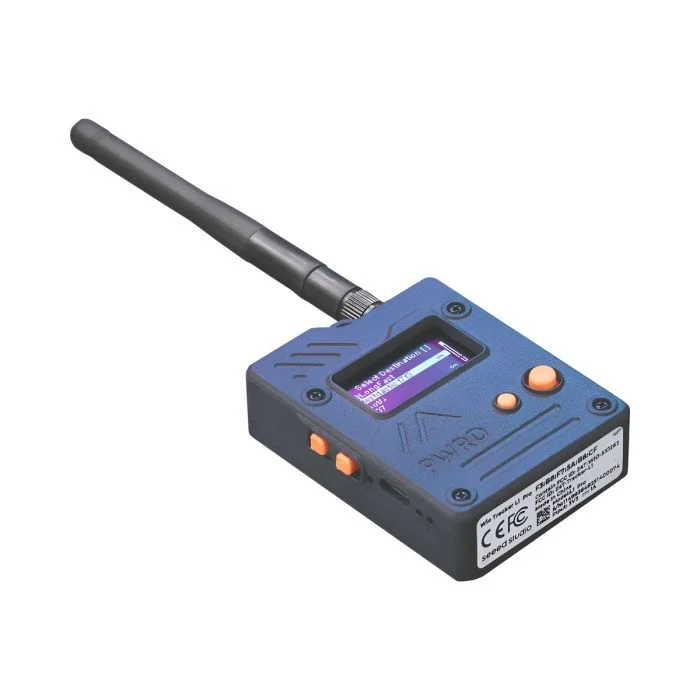
Hardware first. The supported list runs to dozens of boards, including Heltec, RAK Wireless, LilyGo, Elecrow ThinkNode and Seeed Studio. Both the Wio Tracker L1 Pro, pictured here, and the SenseCAP Solar Node are on it, the latter being the sort of thing people bolt to a roof and forget about. The project’s own web flasher is the authority on what is supported, so start there rather than with a forum post from last year.
Three steps gets you running. Flash the firmware from the web flasher, choosing the role you want as you go, and pick companion if this is the node that lives in your pocket. Set the radio parameters. Pair it to the app.
Budget somewhere in the region of a tank of gas for a basic node, less if you already have a spare board in a drawer.
Do not type the radio settings in from this article
There is a community convention for the United States and Canada, and as of October 2025 it is 910.525 MHz, spreading factor 7, 62.5 kHz bandwidth, coding rate 5. Those numbers are printed here so the terms mean something when you see them, not so you can enter them by hand.
The convention is distributed as a preset inside the app rather than baked into the firmware, and it has already changed once. Choose the current regional preset in the app instead. If there is a group operating near you, ask what they are running before you change anything, because a node on the wrong settings is completely deaf to everyone else and gives you no clue that anything is wrong.
Two things about MeshCore’s security deserve more attention than they usually get, and both of them come from the project’s own documentation rather than from a critic.
The default public channel is not private. Its key is published openly, and you can read it in the FAQ. Anything you put on that channel should be treated as a conversation that anyone can join and read, because that is exactly what it is.
Group messages carry no sender signature. MeshCore’s payload documentation states it plainly: the sender name on a channel message is unverified text, so anyone holding the channel key can put any name they like on a message. Direct messages are a different matter, using a proper key exchange with the recipient, but a name on a channel is a claim rather than proof.
None of that makes MeshCore unsafe for what most people use it for. It does mean the phrase “it’s encrypted” is doing less work than people tend to assume when they say it.
Questions People Actually Ask
Do I need a ham license to use either of these?
No. In the United States both run as unlicensed Part 15 devices in the 902 to 928 MHz band. Holding a license changes what you are permitted to do with one, not whether you may own and use it.
Can a MeshCore node talk to a Meshtastic node?
No. They are separate protocols that happen to use the same kind of radio chip in the same band. Nothing passes between them, and putting the two on the same frequency does not change that.
Is MeshCore encrypted?
Direct messages are, using a key exchange between you and the recipient. Channels use a shared key that everyone on the channel holds, and the default public channel’s key is published for anyone to find, so treat that one as open.
Which one should I start with?
Whichever one the people near you are running. Range is the entire point of a mesh, and neither protocol does anything for you if nobody within radio range is using it. Find the local group first and buy hardware second.
Will MeshCore run on the Seeed Wio Tracker L1 Pro?
Yes. It is on the official supported list, with companion, repeater and room server builds available for it.
Is this going to replace a repeater or an HT?
No, and it is not trying to. These are short text messages at very low data rates, with no voice, no images and no live conversation. Think of it as a way to pass notes when the cell network is gone, sitting alongside your radios rather than competing with them.
Trying to Make Sense of the Rest of It?
Plain English explanations are the whole point of this site, and so are the free tools that go with them. Antenna calculators, a Morse trainer, RF exposure and grounding checkers, radio programming guides and live band conditions. All free, all in your browser, nothing to install and no account to create.